
Travellers
It has never been easier to validate your shopping purchases and receive your tax refund.
If Vienna International Airport is your final departure from the EU, proceed to the DEV (Digital Export Validation) area in your designated terminal before checking-in your luggage.
To receive your Customs validation for tax free shopping from any EU country, you must use the following services:
SELF-SERVICE MOBILE DEVICE
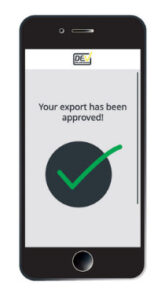
- Find and connect to the DEV WIFI on your mobile device.
- Scan your passport (or enter your passport and boarding card details).
- Your purchases will be displayed on your mobile device.
- Tick the box only for items in your check-in luggage (all other items in your hand luggage will be validated at a DEV counter next to your boarding gate).
✅ Your export has been approved – proceed to your designated check-in counter.
❌👮♂️ Further checks needed – proceed to a Customs’ counter in the DEV area.
SELF-SERVICE DEV KIOSKS
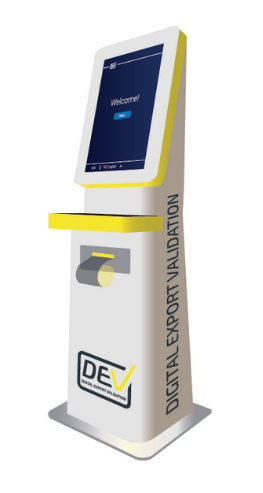
- Scan your passport and boarding card at a self-service kiosk.
- Your purchases will be displayed on screen.
- Tick the box only for items in your check-in luggage (all other items in your hand luggage will be validated at a DEV counter next to your boarding gate).
✅ Your export has been approved – proceed to your designated check-in counter.
❌👮♂️ Further checks needed – proceed to a Customs’ counter in the DEV area.
Other tax free forms
Unable to find your purchases via self-service?
- Proceed to a counter in the DEV area for assistance.
- Please note a fee applies and only non-cash payment is possible.
✅ Your export has been approved – proceed to your designated check-in counter.
❌👮♂️ Further checks needed – proceed to a Customs’ counter in the DEV area
Service charges
| Fee | Service per | |
|---|---|---|
| - | Digital Transaction* | According to the agreement between DEV and your Tax-Free provider |
| 7 € | Non-Digital Transaction** | DEV charges the passenger at the airport |
*Digital transaction means that completely all mandatory data fields required by Austrian regulation were sent to DEV’s digital export validation system, so this transaction is available for self-service validation process (mobile or kiosk) at Vienna airport.
**Non-digital transaction means that all or some mandatory data fields required by Austrian regulation are missing and were not sent to DEV’s digital export validation system. These missing data fields need to be manually filled-in by DEV personnel at DEV counter at Vienna airport and export validation to be done at DEV counter.
The charges apply from 15.02.2023.
For more information, please contact us: info@digitalexportvalidation.com